
Quotations that convert into invoices when accepted
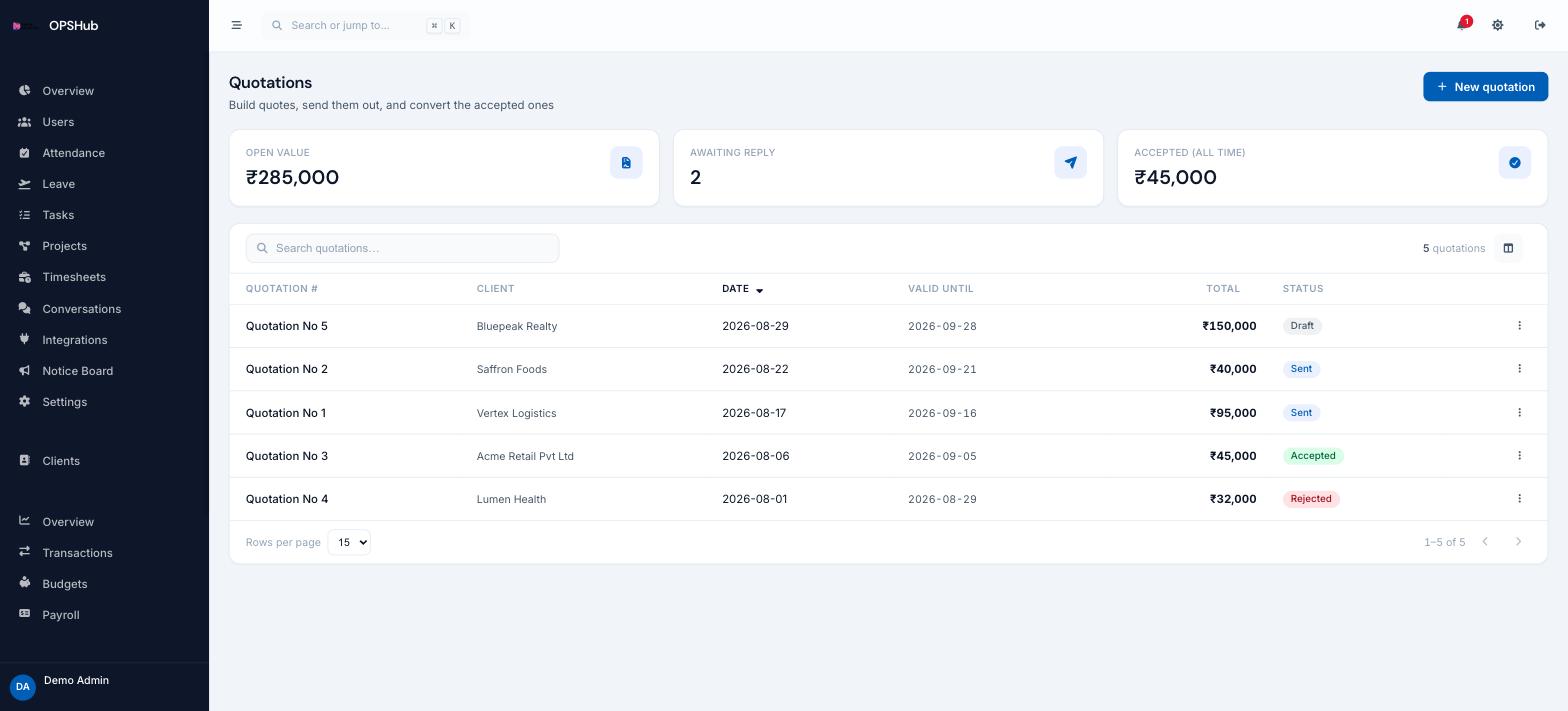
Every quote carries a client, a validity date and a status, so you always know what is sitting unanswered and what it is worth. When one is accepted it becomes an invoice rather than a retyped document.
What you get
Every point below is live in OpsHub today. Nothing here is a roadmap item.
- Open value, awaiting reply and all-time accepted on one screen
- Quotation number, client, date, valid-until date and total per quote
- Status tracked from draft through sent to accepted or declined
- Accepted quotes convert directly into invoices
- Raised against the same client records as your CRM
Questions about quotations
What happens when a client accepts?
The quote is marked accepted and can be converted into an invoice with its client and line items intact.
Can I see what is still unanswered?
Yes - the awaiting-reply count and open value are the first things on the screen.
Is quotations a paid add-on?
It is an optional module enabled per workspace, alongside invoicing, appointments and shift scheduling.
Works with
OpsHub modules share one workspace and one set of records - these are the ones quotations touches most.
See quotations on your workflow.
Book a demo and we will map it to how your team already works - or open the live demo workspace right now.