
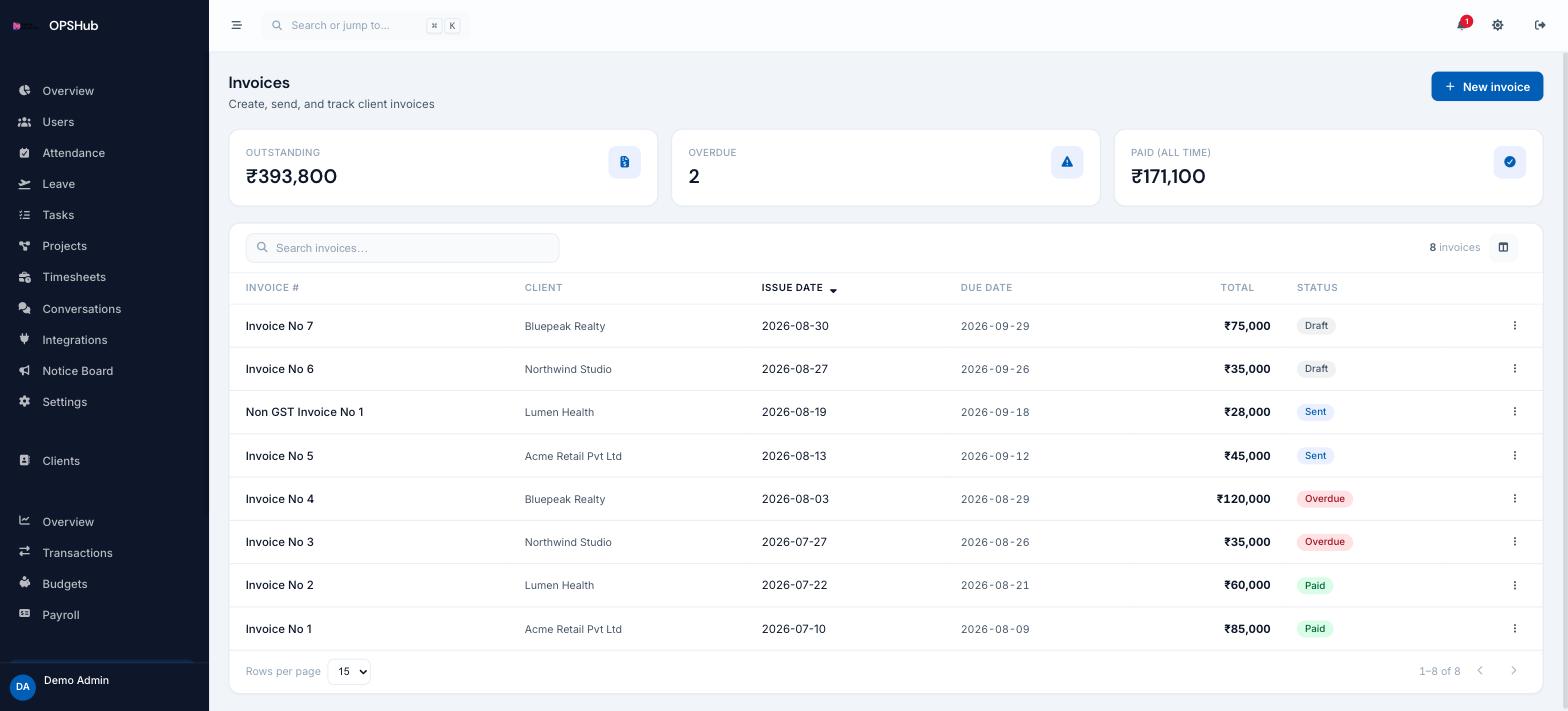
GST-aware invoicing with outstanding and overdue tracking
Invoices are raised against a client already in your CRM and a project already in your delivery board, so the numbers you bill match the work you did. Outstanding, overdue and paid are on the same screen.
What you get
Every point below is live in OpsHub today. Nothing here is a roadmap item.
- GST and non-GST invoices with totals in INR and separate number series
- Outstanding, overdue and all-time paid summarised at the top
- Status per invoice with issue and due dates
- Raised against a client record and, where relevant, a project
- Accepted quotations convert into invoices without re-keying
Questions about invoices & payments
Is invoicing included in every plan?
It is an optional module enabled per workspace. Ask us to switch it on for your deployment.
Does it handle GST?
Invoices are GST-aware and priced in INR. OpsHub records and presents the invoice; it does not file your returns.
Can a quote become an invoice?
Yes. An accepted quotation converts into an invoice, carrying the client and the deliverables over.
Works with
OpsHub modules share one workspace and one set of records - these are the ones invoices & payments touches most.
See invoices & payments on your workflow.
Book a demo and we will map it to how your team already works - or open the live demo workspace right now.