
Multi-level approvals through your reporting chain
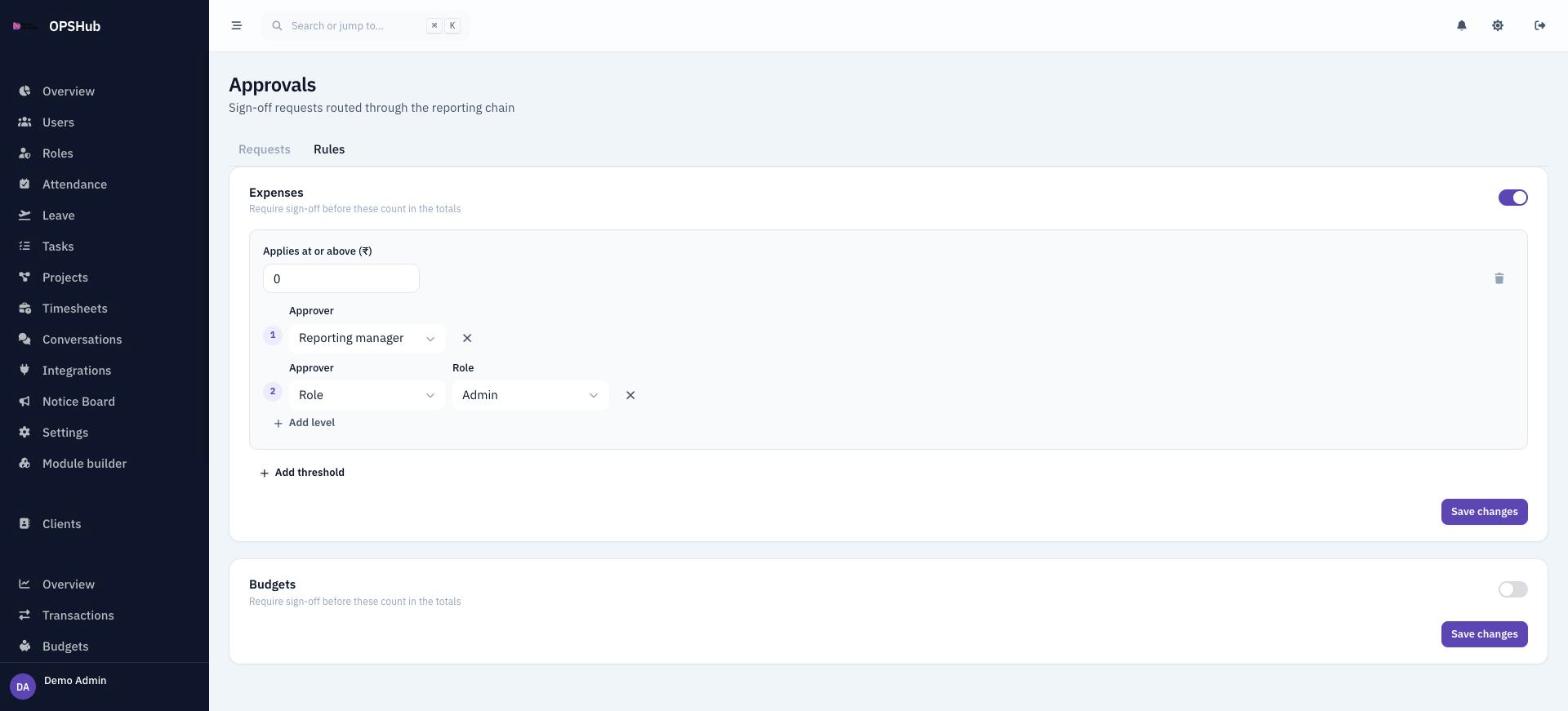
Money should not reach the books on one person's say-so. Switch on approvals for expenses or budgets and every new entry waits for sign-off. You decide who approves at each level and from what amount a request needs one.
What you get
Every point below is live in OpsHub today. Nothing here is a roadmap item.
- Approvals for expenses and budgets, each switched on or off separately
- Each level can be the requester's reporting manager, a role or a specific person
- As many levels as you need, in order
- Amount thresholds: choose which spends need approval and which skip the queue
- If a level resolves to nobody, the request falls back to admins
- An inbox with Awaiting me, My requests and Decided by me, and a note on every decision
Questions about approvals
What goes through approvals today?
Finance expenses and budgets. Leave, timesheets and shift swaps have their own simple approve or reject step. Quotes and invoices do not go through approvals.
Do pending items count in the totals?
No. Items waiting for sign-off are held out of the totals until they are approved.
Are approvers notified?
Yes. Approvers and requesters get in-app notifications when a request is raised or decided.
Works with
OpsHub modules share one workspace and one set of records - these are the ones approvals touches most.
See approvals on your workflow.
Book a demo and we will map it to how your team already works - or open the live demo workspace right now.