
Leave management: requests, balances and approvals
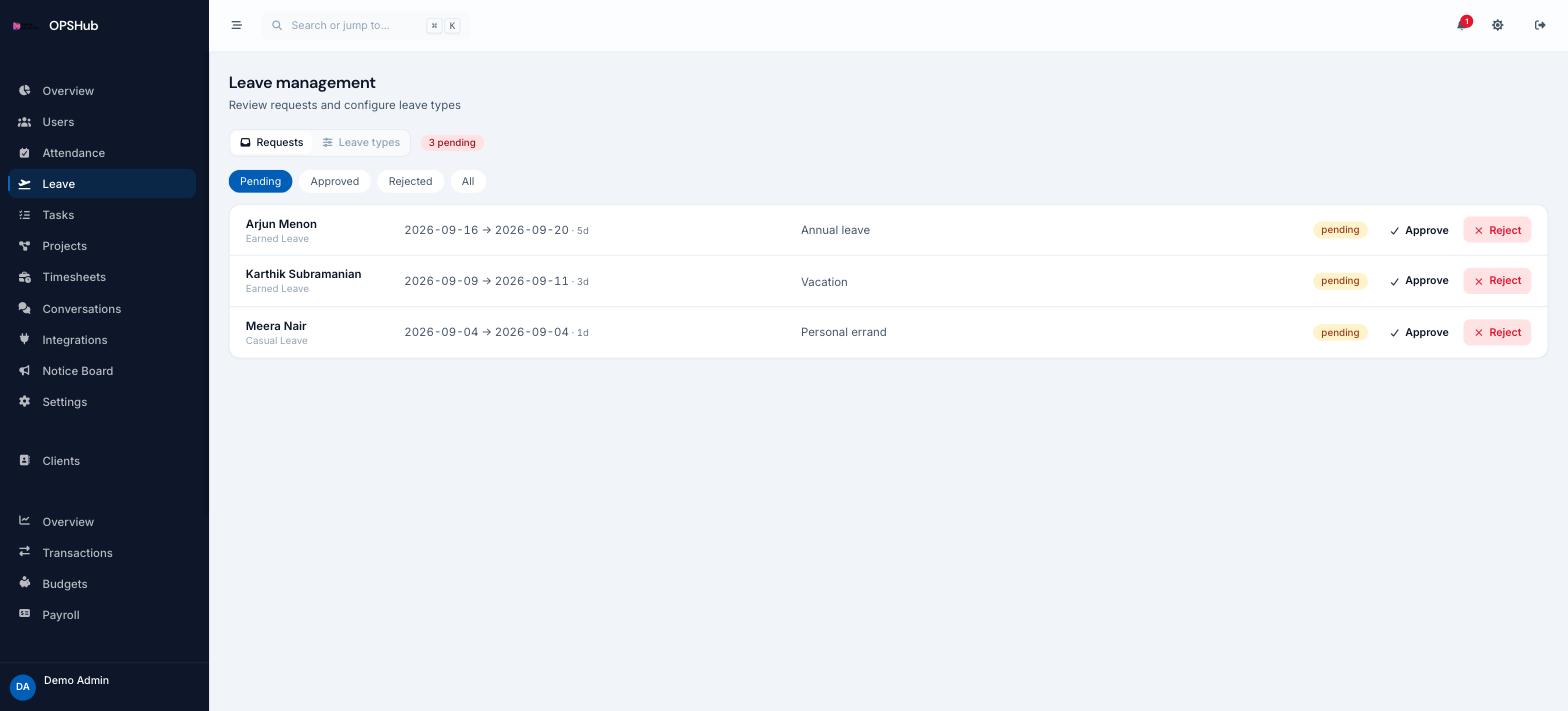
Leave stops living in WhatsApp threads. Staff raise a request against a leave type, you approve or reject it, and the approved days show up in the attendance register and the payroll run without anyone re-entering them.
What you get
Every point below is live in OpsHub today. Nothing here is a roadmap item.
- Define your own leave types with per-type balances
- Employees request leave from the web app or the mobile companion
- Approve or reject with the request history kept against the employee
- Approved leave marks the attendance register automatically
- Holiday calendar so weekly-offs and public holidays are not counted as absence
Questions about leave management
Can we set our own leave types?
Yes. Leave types and their balances are configured per workspace, so casual, sick, earned or any custom category you already use can be mirrored.
What happens to attendance on an approved leave day?
The day is marked as leave in the attendance register rather than absent, so attendance rate and payroll stay correct.
Who can approve leave?
Anyone whose role has update access to Leave: admins by default, plus any custom role you create. Employees can raise and track their own requests but cannot approve them.
Works with
OpsHub modules share one workspace and one set of records - these are the ones leave management touches most.
See leave management on your workflow.
Book a demo and we will map it to how your team already works - or open the live demo workspace right now.